Table of Contents
A memory thumb drive, also known as a USB flash drive, is a small, portable storage device you plug into a USB port to store or transfer files. It’s so simple that anyone can use it, yet it holds powerful tech and has come a long way. Whether you’re backing up photos, moving documents, or getting ready for a presentation, thumb drives are a modern necessity.
What Is a Memory Thumb Drive?
A memory thumb drive is basically a stick-shaped device with flash memory inside and a USB connector outside. No moving parts, which means they’re tough, silent, and quick. You can carry them in your pocket or attach them to a keychain, making them perfect for everyday use.
Sizes, Speeds & Interfaces
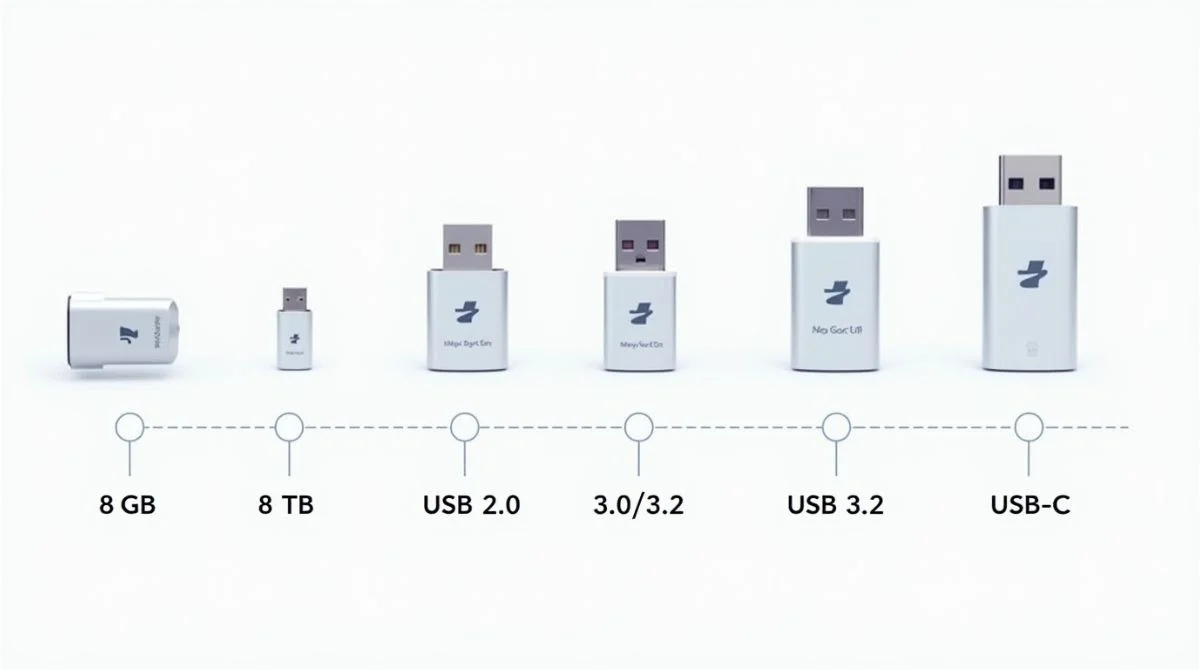
These drives range from 8 GB to 2 TB, so you can store hundreds of photos to entire software libraries. The speed depends on the USB interface you use:
- USB 2.0: slower (up to ~30 MB/s) fine for schoolwork or documents.
- USB 3.0/3.2: much faster (100–600 MB/s), great for video, audio, or frequent use.
- USB-C: offers high speed and convenience for modern laptops and phones.
Tech sites like Tom’s Hardware highlight fast drives such as the Kingston. DataTraveler Max and SK Hynix Tube T31, which approach the speeds of small SSDs
If speed matters to you, these are smart picks.
Choosing the Right Drive
Capacity & Size
Pick a size that fits your use. For daily tasks, 32–128 GB is plenty. For large video files or backups, go for 512 GB or more.
Speed Needs
- Documents? USB 2.0 works fine.
- Photos/videos? Choose USB 3.0 or higher.
- Frequent transfers? Go for top-tier fast drives like those mentioned above.
Port Type
USB-A fits older devices, and USB-C works on newer ones. Many drives now offer dual connectors or adapters.
Build Quality
Metal or rugged casings resist bumps and water, so your data stays safe longer.
How do they work?
Inside, flash memory stores data in tiny cells that hold electric charges. This keeps your files even when the drive’s unplugged. Compared to hard drives, flash memory is tougher, quieter, uses less power, and transfers data faster. Thanks to 3D NAND, drives now store more data without getting larger or slower.
Best Uses for Thumb Drives
- Carrying important files, like presentations or PDFs.
- Backing up photos or documents offline, especially when you don’t trust the internet.
- Moving files between computers when network transfer isn’t available.
- Secure a portable vault if you use encryption or specialized secure drives.
Tips for Performance
- Always eject safely to avoid corrupt files.
- Reformat the drive occasionally to fix errors.
- Don’t fill it to the brim, leaving space helps speed and lifespan.
- Scan for malware before use, especially if you plug into public machines.
- Use a fast USB port: prefer USB 3+ plugs for best speed.
Keeping Your Data Safe
Although these drives are secure, losing one means losing the data inside. Follow these simple tips:
- Use encryption software if you carry sensitive information.
- Try password-protected/capacity-limited drives when needed.
- Never leave the drive plugged in when not in use; malware can sneak in
- Back up your thumb drive to cloud storage or other devices just in case.
When to Use Thumb Drives or Something Else?
Thumb drives are handy and portable, but here are other options to consider:
- Need massive space and speed? Try external SSDs instead, faster but costlier
- Prefer cloud flexibility? Use services like Google Drive or Dropbox.
- Need extra storage for devices? Look into SD or microSD cards, they’ve improved over the years.
How to Search for the Best Content?
If your goal is to write SEO-friendly blog posts about memory thumb drives, remember these tips:
- Put your focus keyword early in titles and headings.
- Use short paragraphs, simple words, bullet points, and real user terms.
- Optimize images: rename with keywords (e.g., “memory-thumb-drive.jpg”) and add alt text.
- Keep mobile design in mind, many readers use phones.
- Create evergreen content but update it with new trends (like faster USB standards or storage tech).
Offer practical tips and answer real questions about thumb drives to satisfy visitor intent.
Future Trends
Expect continued improvements in speed, capacity, and security on thumb drives. Some even come with built-in encryption or biometric locks. With USB4, speeds may rival larger SSDs, but that added micro-SD support and cloud integration will ensure thumb drives stay useful and relevant.
Conclusion
A memory thumb drive is a tiny, powerful tool you carry everywhere. They’re easy to use, fast, affordable, and versatile. Just pick the right capacity, speed, and connector for your needs. Keep backups, stay safe with encryption and careful usage, and you’ll get years of reliable storage and portability.